Donnerstag, 16. Oktober 2025

weiterleitung htaccess

 add


# Redirect Homepage -> /merz-insight/

RewriteEngine On


# Nur wenn exakt die Root-URL aufgerufen wird (mit/ohne Query-String)

RewriteCond %{REQUEST_URI} ^/?$ 

RewriteRule ^$ /???-insight/ [R=301,L]


  • Position: Unbedingt über dem WordPress-Block einfügen, sonst greift die Regel evtl. nicht.


Dienstag, 10. Juni 2025

Worttrennung CSS & Spiegelstrichliste

 p, h1, h2, h3, h4, h5, h6 {

    overflow-wrap: break-word;

    word-wrap: break-word;

    hyphens: auto;

}


.spiegelstrich-liste {

  list-style-type: none;

  padding-left: 0;

}


.spiegelstrich-liste li::before {

  content: "–";

  color: #c455c6; /* Optional: Spiegelstrich-Farbe */

}

Mittwoch, 8. Januar 2025

iMovie Projekte kopieren zu anderem Mac oder exportieren

 https://www.youtube.com/watch?v=a45dWFzMmy4 

Donnerstag, 28. November 2024

Notice: Function _load_textdomain_just_in_time was called incorrectly. complianz-gdpr

 For the developers: Please change line 224 in complianz-gdpr.php to

    'after_setup_theme',

wp-admin

plugins

complianz-gdpr

https://wordpress.org/support/topic/function_load_textdomain_just_in_time-msg-in-wp-6-7-1/

Mittwoch, 11. September 2024

Backup, Restore, Migration, Staging Plugin WPvivid Backup Plugin


WPvivid Backup Plugin


https://docs.wpvivid.com/get-started-transfer-site.html

Donnerstag, 2. Mai 2024

Excel split first name last name from one cell into two

 https://www.youtube.com/watch?v=loWNs1KJSm8


Freitag, 15. März 2024

Set Up Site Kit Wordpress plugin

 https://www.youtube.com/watch?v=lKiZSgE1Cgw

Sonntag, 10. März 2024

NexGen Gallery Anleitung

 https://www.imagely.com/docs/add-album/ 

Step by Step instruction

  1. Gallerie erstellen
  2. Bilder hochladen
  3. Album erstellen
  4. Album auswählen (Oben links dropdown) und grüne Gallerie zuteilen
  5. Edit page mit alben, neues hinzufügen.

Freitag, 8. März 2024

Image Pro Module - Adjust font size responsive CSS

 .image-pro-wrap {

  font-size: clamp(16px, 1vw, 28px);

  line-height: 35px;

}


https://www.youtube.com/watch?v=erqRw3E-vn4 


Donnerstag, 7. März 2024

Themify Builder CSS disrupted

 Einstellungen / Auto Optimize: Haken raus bei CSS optimieren


Regenerate CSS
Clear Themify Cache


Evtl. Complianz Plugin deaktivieren


Freitag, 23. Februar 2024

WP Migration Tipps

  1.  Hintergrundbilder in rows oder columns werden nach Migration nicht angezeigt


  2. Permalinks werden nicht aktualisiert: 2x (!!!) auf speichern klicken


  3. https://www.youtube.com/watch?v=jmuXY6IIzuc

Mittwoch, 3. Januar 2024

Wordpress Dashboard without CSS

 https://www.youtube.com/watch?v=_aeQMYV1pRg

Freitag, 28. Juli 2023

Anchor, scroll to ID, add margin

 :target::before { content: ''; display: block; height: 50px; margin: -50px 0 0 0; }


https://perishablepress.com/margin-offset-anchor-targets/

Montag, 24. Juli 2023

WP Themify Font upload - not allowed to upload

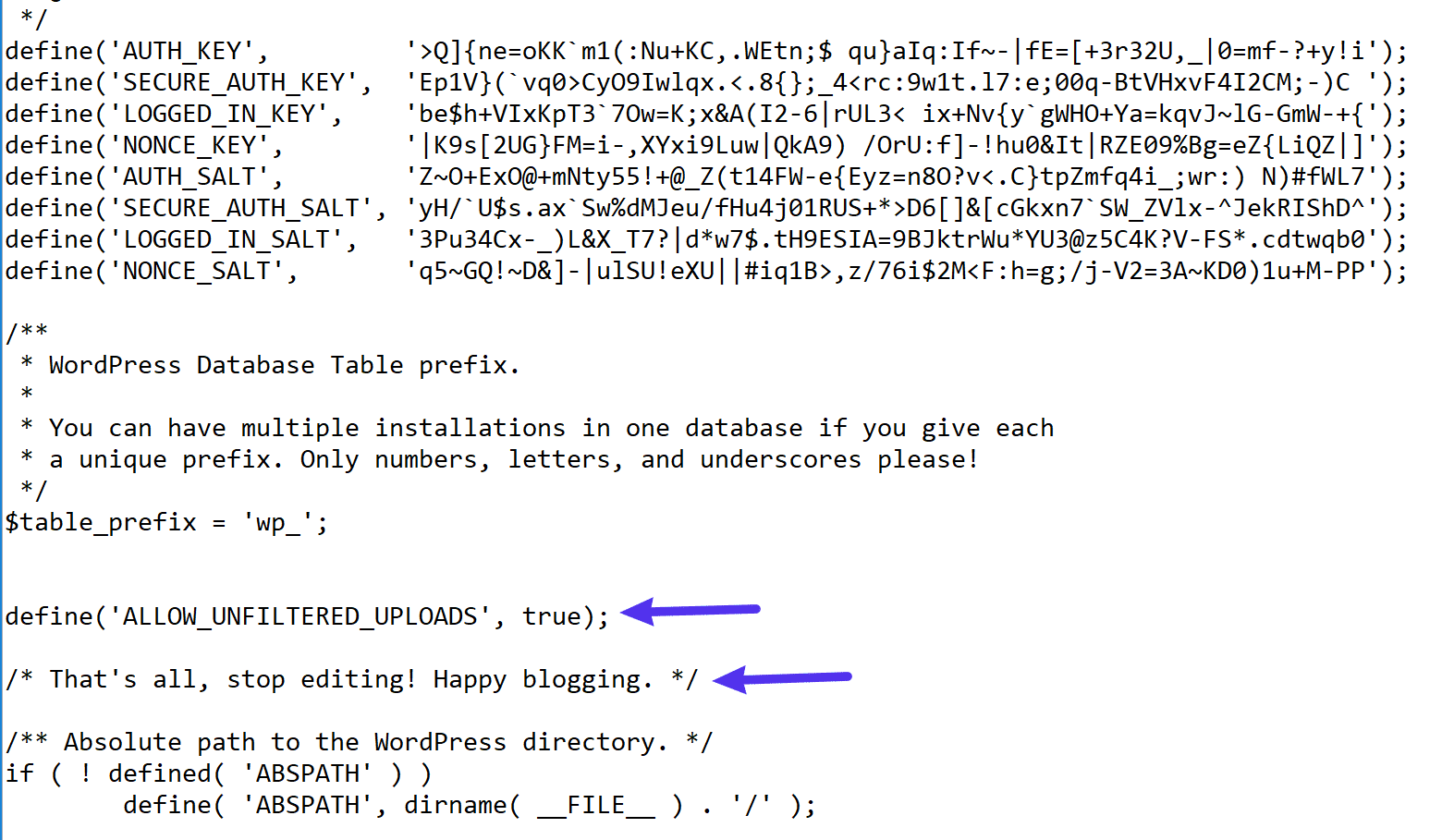
 Then, while editing the wp-config.php file, add the following code snippet above the /* That’s all, stop editing! Happy blogging. */ line:

define('ALLOW_UNFILTERED_UPLOADS', true);

Where to add the code in your wp-config.php file

Montag, 5. Juni 2023

Samstag, 11. März 2023

Function error - Die Funktion WP_Object_Cache::get wurdefehlerhaftaufgerufen

 https://wordpress.org/support/topic/notice-function-wp_object_cacheget-was-called-incorrectly/


Zuordnung Events zu einer Kategorie löst das Problem. 


Notice: Die Funktion WP_Object_Cache::get wurdefehlerhaftaufgerufen. Der Cache-Schlüssel muss eine Ganzzahl oder eine nicht leere Zeichenfolge sein, NULL ist der vorgegebene Typ. Weitere Informationen:Debugging in WordPress (engl.). (Diese Meldung wurde in Version 6.1.0 hinzugefügt.) in/var/www/vhosts/web163.login-4.loginserver.ch/httpdocs/wordpress/wp-includes/functions.phpon line5835

Donnerstag, 8. Dezember 2022

Auto Update Year Themify

working


<p style="text-align: center"; class="copyright">Copyright © <script>document.write(new Date().getFullYear())</script> Designed by <a href="http://www.webxpress.ch" target="_blank" rel="noopener">xPress Merz & Partner</a>.</p>


Code als plain text

© <script type="text/JavaScript">


document.write(new Date().getFullYear());


</script>


Firmenname XY. All Rights Reserved.

Sript Header oder Footer Code Themify:

<script type="text/JavaScript"> var theDate=new Date() document.write(theDate.getFullYear()) </script>

Mittwoch, 9. Februar 2022

Footer Copyright Hook content

 <p style="text-align: center;">Copyright © [y] Designed by <a href="http://www.webxpress.ch" target="_blank" rel="noopener">xPress Merz & Partner</a>.</p>

Montag, 13. Dezember 2021

Wordpress Umzug - Image URL's anpassen Themify

 Go to Themify Ultra > Themify Buider > Tools > Find & Replace > Search for old URLs and replace them with the new one. 

Freitag, 5. November 2021

Woocommerce CHF abstand code

 Zu Snippet Code hinzufügen:


https://www.cubetech.ch/eigene-wahrung-und-eigenes-wahrungssymbol-in-woocommerce/


add_filter( 'woocommerce_currencies', 'add_my_currency' );

function add_my_currency( $currencies ) {
    $currencies['CHF'] = __( 'Schweizer Franken (mit Abstand)', 'woocommerce' );
    return $currencies;
}

add_filter('woocommerce_currency_symbol', 'add_my_currency_symbol', 10, 2);
function add_my_currency_symbol( $currency_symbol, $currency ) {
     switch( $currency ) {
          case 'CHF': $currency_symbol = '<small>CHF</small>&nbsp;';
          break;
     }
     return $currency_symbol;
}

Donnerstag, 7. Oktober 2021

Wordpress Base URL anpassen

  1.  Im Hosting neuen Ordner angeben
  2. im Wordperss neue Base URL setzen & Alias

Donnerstag, 5. August 2021

themify disable image lazy load

 Please go to Themify > Settings > Theme Settings > Performance, disable the lazy loading feature, and retest.

Mittwoch, 4. August 2021

Fatal error: Class 'FOF30\Container\Container'


Stern aktivStern aktivStern aktivStern aktivStern aktiv
  

Nach einem Update von AKEEBA Backup ist das gesamte Backend nicht mehr erreichbar.

Fatal error: Class 'FOF30\Container\Container' not found in /~/plugins/quickicon/akeebabackup/akeebabackup.php on line 240

Ursache hierfür sind fehlende Dateien um FOF30 Framework von Akeeba.

Um wieder ans Backend heran zu kommen müssen die Plugin-Ordner von Akeeba umbenannt werden ( einfach eine # davor, fertig):

/plugins/system/akeebaupdatecheck

/plugins/system/backuponupdate

/plugins/quickicon/akeebabackup

Anschließend ist das Backend wieder erreichbar und man kann das Update noch einmal einspielen.

Mittwoch, 2. Juni 2021

Wordpress Cookies - einzelne Cookies managen

 <div class="cli-bar-container cli-style-v2"><div class="cli-bar-message">Für die Bereitstellung des bestmöglichen Service verwenden wir Cookies. Mit der Nutzung der Website erklären Sie sich mit dem Einsatz einverstanden. </div><div class="cli-bar-btn_container">[cookie_settings margin="0px 5px 0px 0px"][cookie_accept_all]</div></div>


GDPR Cookie Consent

Eine einfache Möglichkeit, zu zeigen, dass deine Website konform zu DSGVO und „EU-Cookie-Richtlinie“ ist.

Version 2.0.3 | Von WebToffee | Details ansehen

Donnerstag, 6. Mai 2021

WP Code Hide ReCaptcha V3 banner bottom right

 .grecaptcha-badge { opacity:0;}


add to privacy


Diese Website ist durch reCAPTCHA geschützt und es gelten die Google-Datenschutzbestimmungen und Nutzungsbedingungen.


This site is protected by reCAPTCHA and the Google Privacy Policy and Terms of Service apply.

https://agvento.by/en/web-development-en/how-to-remove-recaptcha-v3-icon/ 


https://developers.google.com/recaptcha/docs/faq


This site is protected by reCAPTCHA and the Google <a href="https://policies.google.com/privacy">Privacy Policy</a> and <a href="https://policies.google.com/terms">Terms of Service</a> apply.

How to hide reCAPTCHA v3 notifications without violating the terms of service

If you don’t want to see the ubiquitous recaptcha notification on your site pages, you need to perform a number of actions.

  1. Hide the icon itself.
    1. Set value inline for attribute data-badge in the code of the button for submitting the form. 
    2. Add to the file of styles the CSS code .grecaptcha-badge {visibility: hidden;}
  2. Add this information under the form or in  the footer of your website next to the privacy policy:
    1
    2
    3
    
    This site is protected by reCAPTCHA and the Google  
    <a href="https://policies.google.com/privacy">Privacy Policy</a> and 
    <a href="https://policies.google.com/terms">Terms of Service</a> apply.

Sonntag, 2. Mai 2021

Joomshaper # hyperlink gap from the top - SP Page Builder

 Insert Raw html with anchor


<a name="grundrisse"></a> 

Mittwoch, 23. September 2020

Wordpress WPML Multilingual Tranlsation

 https://www.youtube.com/watch?v=dvlY-U1RIBw

Sonntag, 31. Mai 2020

Themify remove social media icons in image gallery

add css

.tb_social_sharing{ display:none; }

wordpress inscecure mixed content

https://wpbuffs.com/wordpress-https-mixed-content/

solved with really simple ssl plugin.

Donnerstag, 26. März 2020

WP Themify - schroll to ID

https://themify.me/forum/topic/ultra-row-options

Please see the screenshot https://snipboard.io/3bBZY7.jpg, Please try adding a plain text module to your subrow and add the following code:
Just replace the “anchorname” is your anchor name.

Sonntag, 22. März 2020

fit images

img { height: 120px; } .cover img { width: 260px; object-fit: cover; }


css class

cover
https://css-tricks.com/almanac/properties/o/object-fit/


https://www.w3schools.com/css/css3_object-fit.asp

 src="http://i.stack.imgur.com/2OrtT.jpg" class="cover" width="242" height="363" />

.cover {
  object-fit: cover;
  width: 50px;
  height: 100px;
}

Montag, 17. Februar 2020

wp accesssibility issue open links in new tab

When I activate Plugin WP Accessibility, then all links of files to open in new tab/window I set are not working anymore, they open all in dame window. When I deactivate it, it works fine.
REPLY:
Please notice that this issue is related to your plugin not the theme.
It’s also never tested plugin, so it’s not supported.
However, please notice that the recommendation of W3C accessibility is to not open any links in new tab – so your plugin works fine, as intended and as designed.
“… In general, it is better not to open new windows and tabs since they can be disorienting for people, especially people who have difficulty perceiving visual content….”
Best regards,

Sonntag, 9. Februar 2020

joomla joomshaper blog image layout fit box

.article-list .article .article-feature-gallery img, .sppb-addon-articles .article .article-feature-gallery img, .article-list .sppb-addon-article .article-feature-gallery img, .sppb-addon-articles .sppb-addon-article .article-feature-gallery img, .article-list .article .article-featured-audio img, .sppb-addon-articles .article .article-featured-audio img, .article-list .sppb-addon-article .article-featured-audio img, .sppb-addon-articles .sppb-addon-article .article-featured-audio img, .article-list .article .article-featured-video img, .sppb-addon-articles .article .article-featured-video img, .article-list .sppb-addon-article .article-featured-video img, .sppb-addon-articles .sppb-addon-article .article-featured-video img, .article-list .article .article-intro-image img, .sppb-addon-articles .article .article-intro-image img, .article-list .sppb-addon-article .article-intro-image img, .sppb-addon-articles .sppb-addon-article .article-intro-image img {
    border-radius: 0;
    background-size: cover;
    background-position: center;
    background-repeat: no-repeat;
    width: 100%;
    height: 100%;
}

Mittwoch, 29. Januar 2020

Image Captions in Editor - Bildbeschriftungen

HTML in captions

It is not possible to write HTML tags directly into your image’s attributes. But you can use special tags (similar to BBCode) that will get converted to HTML tags by EasyImageCaption. The following table lists all supported tags.
In order to use this feature, you have to enable the parsing of tags in the plugin parameters.
Formatting tag in captionHTML output
[url]www.example.com[/url]www.example.com
www.example.com
[url=www.example.com]Click here[/url]Click here
Click here
[url2]www.example.com[/url2]www.example.com
www.example.com
[url2=www.example.com]Click here[/url2]Click here
Click here
[b]Bold example[/b]Bold example
Bold example
[i]Italic example[/i]Italic example
Italic example
[u]Underlined example[/u]Underlined example
Underlined example
First paragraph[br]Next paragraphFirst paragraph
Next paragraph
First paragraph
Next paragraph
*The effect of [url] und [url2] can be switched in the plugin options.

Montag, 20. Januar 2020

Generate ReCaptcha API Key

https://www.google.com/recaptcha/admin/create

RS Form Pro download Plugin Recaptcha 2:
https://www.rsjoomla.com/support/documentation/rsform-pro/plugins-and-modules/no-captcha-recaptcha-plugin.html

Sonntag, 19. Januar 2020

joomshaper sticky top bar and menu manuell


#sp-header:not(.header-sticky) {
    padding: 0px 0;
    background: #ffffff !important;
    -webkit-transition: all 0.3s ease-in-out;
    transition: all 0.3s ease-in-out;
    margin-top: 38px;
}
#sp-header.header-sticky {
    position: fixed;
background:#ffffff!important;
    z-index: 9999;
    top: 38px;
}
#sp-top-bar {
   position: fixed;
height: 38px;
    top: 0;
    z-index: 99;
    width: 100%;
}
transparent-header #sp-header:not(.header-sticky) {
    height: 85px;
    box-shadow: none;
    background-color: white;
    position: fixed;
}

Sonntag, 12. Januar 2020

yamas template - hide list style lines

.sppb-addon-text-block .sppb-addon-content ul li::before {
display: none;
}

.sppb-addon-text-block .sppb-addon-content ul li {
    position: relative;
    padding-left: 3px;
    margin-top: 8px;
    list-style: none;
    list-style-type: disc;
    margin-left: 17px;
}
small {

Mittwoch, 8. Januar 2020

Erweiterungen für Joomla, bei denen ine Googlemap mit diversen Standorten eingebaut werden kann


Kennt jemand eine tolle Erweiterung für Joomla, bei der eine Googlemap mit diversen Standorten eingebaut werden kann, die dann gefiltert werden können?
Formularbeginn

JOOMUNITED.COM
My Maps Location - Google Maps für Joomla
·       Michael GaKi Ich nutze PhocaMaps. Da wird allerdings nicht Google, sonder ein OpenSource-Dienst genutzt. Man legt in der COmponent die Standorte an, generiert dann ein Macro und fügt das in den Artikel ein.
·       Rene Rothensee Hotspots von Compojoom fällt mir noch ein. https://compojoom.com/joomla-extensions/hotspots
COMPOJOOM.COM
Hotspots - Advanced Google Maps Manager for Joomla! - compojoom.com
Ronald Wegert Von Hotspots rate ich ab. Mieser Support. Sehr umfangreich ist: https://www.joomunited.com/.../my-maps-location...
EXTENSIONS.JOOMLA.ORG
Zh GoogleMap, by Dmitry Zhuk - Joomla Extension Directory
·       Florian Häusler Für 0 € & Deutscher Support ;)
https://www.hr-it-solutions.com/.../4/gmaps-locations...

HR-IT-SOLUTIONS.COM
GMaps Locations
Formularende