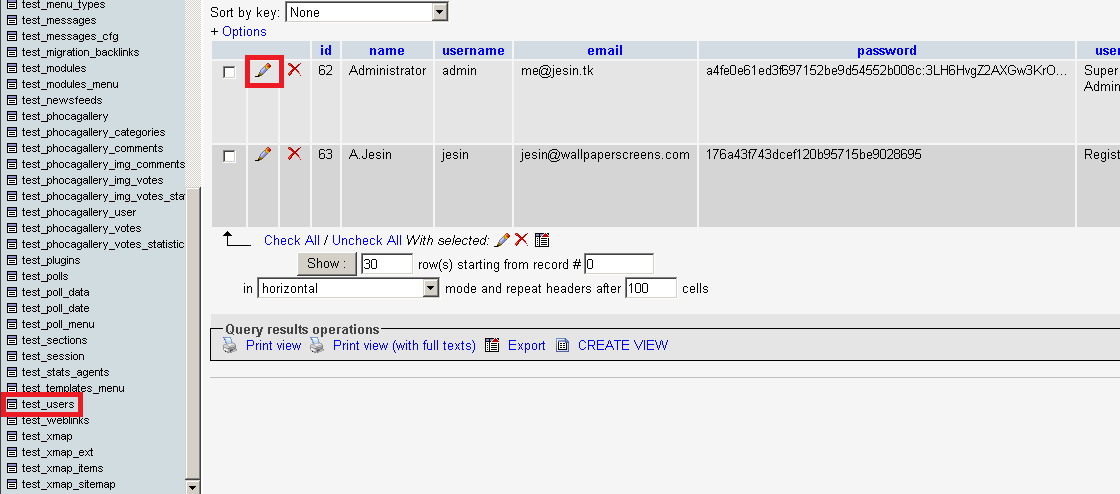
Using phpmyadmin will make your job much easier. Open your web hosting control panel and under the databases section click phpmyadmin. After phpmyadmin loads select your joomla database. Navigate to the jos_users table (replace jos_ with your own database prefix). Click the edit icon next to the administrator user.
Click the edit icon and edit the password field
Now the password displayed under the “password” column is an encrypted and salted so there is no way of recovering it. Use the MD5 Encryption Tool to generate an MD5 encrypted password which is required by Joomla. Following are some examples
Next to the password field delete the old string and place the new one. Do take note that this is just an encrypted password and can be easily decrypted. Click go, log out of the phpmyadmin panel. Now go to http://yourjoomlasite.com/administrator login with your admin username and the new password and IMMEDIATELY change your administrator password to something else secure.
Method 2:- Using the MySQL command line tool
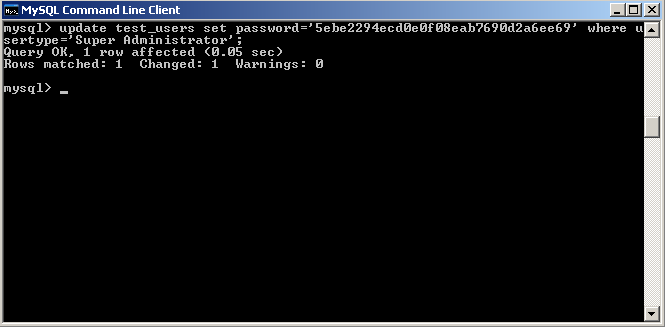
If you don’t have phpmyadmin installed or if you have access to the MySQL command line tool then run a SQL query to change the password. First go to MD5 Encryption Tool and generate a MD5 encrypted hash. Then open the MySQL command line client and run the following queries mysql> connect joomla; mysql> update test_users set password='5ebe2294ecd0e0f08eab7690d2a6ee69' where usertype='Super Administrator'; Replace joomla with your joomla database name and test_users with your databaseprefix_users.
Type the SQL query to update the password field with a new password
IMMEDIATELY login to your joomla administrator panel and change the password.
Method 3:- Using PHP MySQL function
This method is extremely useful if your on a shared hosting server which has no phpmyadmin. Since it is shared you’ll have no means to access MySQL command line tools. But worry not you can query the database using PHP. Generate an MD5 encrypted password using MD5 Encryption Tool then create a PHP file named passchange.php and enter the following code ini_set("display_errors","On"); $con=mysql_connect("localhost","username","password"); mysql_select_db("joomla",$con); mysql_query("update test_users set password='2c17c6393771ee3048ae34d6b380c5ec' where usertype='Super Administrator'") or die(mysql_error()); ?> Replace localhost, username, password, joomla with your MySQL host, username, password and joomla database name, similarly the table name test_users should contain your database prefix. Access the file via the web browser by typing the url (http://yourjoomlasite.com/passchange.php) is you see a blank page without errors the its most likely the password has been changed. Go to your joomla control panel login using your admin username and new password and change the password IMMEDIATELY to something secure.
Note:- Method 2 and 3 will work properly only if there is one Super Administrator, if there are 2 or more then all their passwords will be changed because the condition given in the query says “update” the table “where usertype=’Super Administrator'”